
Seamless Managed File Transfer with AWS Transfer Family and Amazon S3

By Ananta Cloud Engineering Team | September 14, 2025

In today’s enterprise landscape, secure, scalable, and reliable file transfers are mission-critical—especially when integrating legacy systems with modern cloud-native applications. Traditional FTP/SFTP servers are often difficult to scale, lack redundancy, and demand constant operational overhead.
Enter AWS Transfer Family, a fully managed, secure, and highly available service that enables the transfer of files directly into and out of Amazon S3 using protocols like SFTP, FTPS, and FTP—without the need to manage any infrastructure.
In this blog, we’ll explore how Ananta Cloud helps clients streamline their Managed File Transfer (MFT) operations using AWS Transfer Family and Amazon S3, reducing operational costs and increasing data reliability.
What is AWS Transfer Family?
AWS Transfer Family is a fully managed service that enables enterprises to move file-based workloads to AWS with little or no changes to existing workflows. It supports standard protocols:
SFTP (Secure File Transfer Protocol)
FTPS (File Transfer Protocol Secure)
FTP (File Transfer Protocol)
This makes it easy to integrate with partners, vendors, or internal systems that depend on these protocols for secure file exchange.
Architecture Overview: Transfer Family + S3
Here's how a typical Managed File Transfer solution looks using AWS:
Client/Partner System: Initiates connection via SFTP/FTPS/FTP.
AWS Transfer Server: Handles incoming file transfer requests securely.
Amazon S3 Bucket: Stores files for further processing, analytics, or archival.
IAM Roles & Policies: Enforce least-privilege access control.
Logging & Monitoring: Amazon CloudWatch + AWS CloudTrail for auditability.
Optional Lambda Triggers: For real-time post-processing of transferred files.
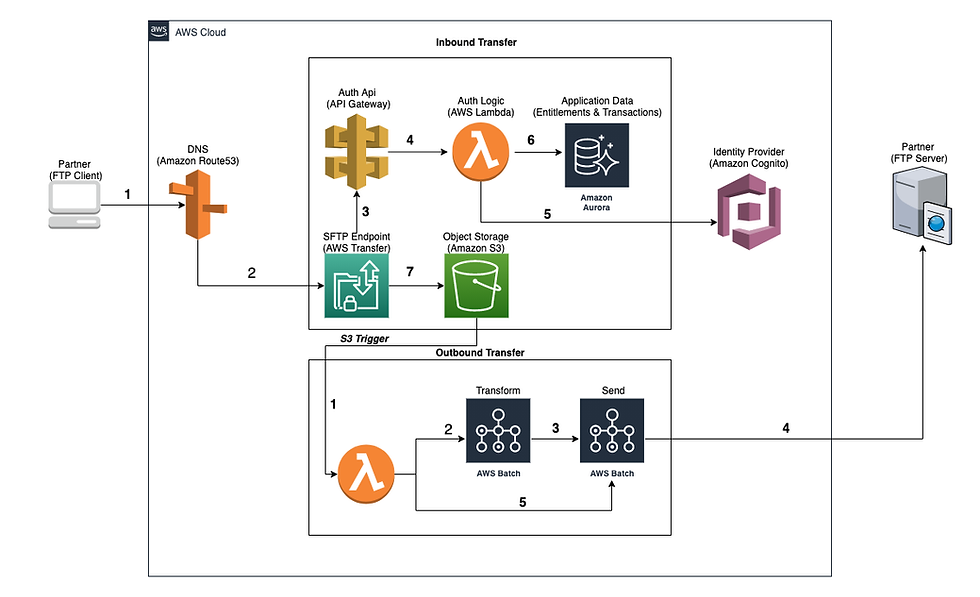
This architecture leverages Amazon Aurora to store application data and Amazon Cognito for managing user identities and credentials. It facilitates both inbound and outbound data transfers. During inbound transfers, users can connect to the SFTP endpoint to upload or download data files. For outbound transfers, the system delivers data to a customer's designated SFTP location, based on their access rights.
Inbound Transfer Flow
When users initiate a connection using the SFTP domain URL, Amazon Route 53 handles the DNS resolution and returns the corresponding AWS Transfer Family endpoint.
The user's request, including their login credentials (username and password), is routed to the AWS Transfer Family service. This service then calls a custom authentication API hosted on Amazon API Gateway, which verifies the credentials.
API Gateway triggers a Lambda function named AuthLogic, which contains custom logic for authenticating users. This function uses the Amazon Cognito API to validate credentials and enforces business rules related to entitlements.
Once the user is successfully authenticated, AuthLogic queries the Aurora database to retrieve the user's entitlement information.
Based on these entitlements, the system generates a custom IAM policy and a logical directory mapping, which are returned to the AWS Transfer Family. Using this mapping, AWS Transfer Family provides the user with access to specific folders that are backed by Amazon S3. S3 enforces the IAM policy to authorize access to the data.
Outbound Transfer Flow
This part of the solution is optional and can be implemented based on the specific requirements of your application. It is often used in cases where analytics or AI/ML applications process data stored in Amazon S3.
When a file is uploaded to S3 via the SFTP endpoint, S3 event notifications are triggered, which invoke a Lambda function.
This Lambda function retrieves subscription information from the Aurora database based on the file group and, if necessary, initiates a data transformation job. Transformations may include converting file formats (e.g., JSON to CSV) or converting healthcare data to comply with HL7 standards. For long-running transformation tasks, AWS Batch is used to process the jobs.
Once the transformation is complete, a send job is generated to deliver the final file to each customer's SFTP location.
If no transformation is required, the Lambda function directly initiates the send job, which pushes the file to the appropriate subscribers.
Step-by-Step: Setting Up Managed File Transfer
Let’s walk through the process of setting up an MFT pipeline using AWS Transfer Family and Amazon S3.
1. Create an S3 Bucket
This bucket will act as your file repository. Apply proper S3 bucket policies to restrict access.
aws s3 mb s3://ananta-mft-bucket
2. Create a Transfer Family Server
aws transfer create-server \
  --protocols SFTP \
  --identity-provider-type SERVICE_MANAGED
Protocols: SFTP is the most commonly used in enterprise integrations.
Identity Provider: Choose SERVICE_MANAGED or use API_GATEWAY for custom integrations.
3. Create a User for the Transfer Server
aws transfer create-user \
  --server-id s-12345678 \
  --user-name partner-user \
  --role arn:aws:iam::123456789012:role/TransferUserRole \
  --home-directory /ananta-mft-bucket/incoming \
  --ssh-public-key file://partner-key.pub
Assign appropriate IAM roles with access only to required S3 prefixes.
Optionally restrict IP addresses using security groups or network controls.
4. Monitor Transfers with CloudWatch
Enable logging for operational visibility.
aws transfer update-server \
  --server-id s-12345678 \
  --logging-role arn:aws:iam::123456789012:role/TransferLoggingRole
View real-time metrics on:
Number of connected users
Data transfer volumes
Errors and alerts
Security Best Practices
Use IAM role policies to limit user access to specific S3 prefixes.
Enforce encryption using S3 server-side encryption (SSE).
Enable logging for compliance (CloudTrail, CloudWatch Logs).
Rotate SSH keys regularly or integrate with AWS Secrets Manager.
Why Ananta Cloud?
Ananta Cloud specializes in building cloud-native MFT pipelines that are:
Secure: Enforced encryption and IAM-based access control.
Scalable: No servers to manage or maintain.
Cost-efficient: Pay only for what you use.
Auditable: Fully traceable for compliance and governance.
Whether you're onboarding new partners or modernizing legacy FTP systems, we ensure your data is transferred reliably and securely, 24/7.
Use Cases
B2B Partner Integrations
Financial & Healthcare Data Transfers (HIPAA-ready)
Real-time ETL Pipelines Triggered from Incoming Files
Onboarding Legacy Mainframe Data Workflows
Conclusion
AWS Transfer Family combined with Amazon S3 delivers a powerful, fully managed alternative to legacy file transfer solutions. By eliminating server maintenance and providing out-of-the-box support for secure protocols, it allows enterprises to focus on innovation—not infrastructure.
📢 Ready to Modernize Your File Transfer Workflow?
Let Ananta Cloud help you build a secure, scalable MFT solution on AWS. Contact us today for a free consultation or a tailored architecture review.
Email: hello@anantacloud.com | LinkedIn: @anantacloud | Schedule Meeting


Comments